Guide
When is an AI agent in accounts payable actually auditable?
Short answer: An LLM wired to a mailbox that drafts invoices is a prototype, not an auditable accounts payable process. In production, extraction travels with checks that do not depend on the model's confidence: arithmetic on the printed figures, a link from each value to the source page, and a hold for failures, possible duplicates and a missing purchase order. A person reviews only those discrepancies. A confidence score only chooses the queue. It is not a posting decision.
When is an AI agent in accounts payable actually auditable?
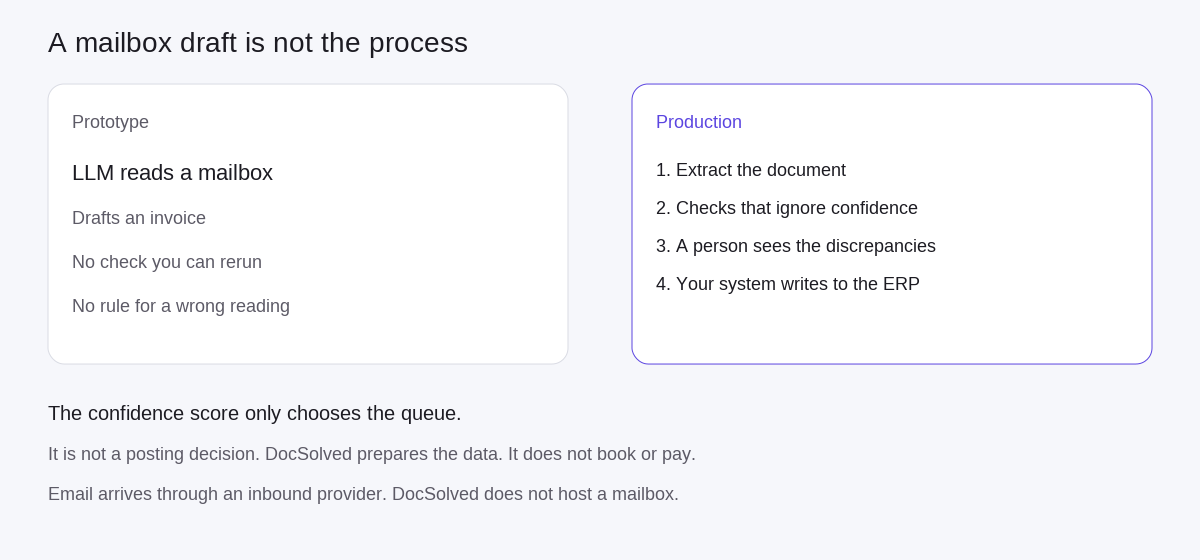
An LLM wired to a mailbox that drafts invoices is a prototype, not an auditable accounts payable process. In production, extraction travels with checks that do not depend on the model's confidence: arithmetic on the printed figures, a link from each value to the source page, and a hold for failures, possible duplicates and a missing purchase order. A person reviews only those discrepancies. A confidence score only chooses the queue. It is not a posting decision.
The phrases AI agents accounts payable, auditable invoice extraction, LLM invoice mailbox, invoice OCR confidence not enough, and invoice totals check before ERP name this same decision. The agent is auditable when those checks exist outside the model, and when a person can see why a document was held.
People are asking this of companies that already run accounts payable. A thread on r/CFO is titled Anyone from real companies actually using AI. The link is in the sources. This page does not quote that thread, and it does not take a figure, a date, or a list of questions from it.
Is an LLM that reads invoices from a mailbox a production AP process?
No. An LLM that reads invoices from a mailbox and drafts a booking is a prototype. A draft can look complete and still leave you with no controls, no replayable trail, and no rule for when the model is wrong. A production path extracts the document, runs checks that do not depend on confidence, holds the failures for a person, and lets a system you control write to the ERP.
Extraction is not posting. The model can fill a draft that looks finished. Without a check you can rerun, a link back to the page, and a rule for a wrong reading, the draft is not a process an auditor can follow. Keep this about the path, not about which model wrote the draft.
Why is a confidence score not enough to post an extracted invoice to the ERP?
A confidence score is an estimated probability that a reading is correct. It does not check the arithmetic, it does not know which vendor you buy from, and it does not see that the same invoice was already posted. A high score can sit on a bad total, a duplicate, or a value that is not on the page. The threshold only chooses the queue.
Four ordinary cases show why a score is not a posting decision. A total can be read from the right place and still fail to add up with the lines. The same invoice can arrive twice, with a high score both times. A supplier name can be read perfectly and still be a vendor you do not buy from. A number can be produced for a field that is not on the page. None of those is a low score. A gate that only looks at the score lets them through.
How to set the threshold, and what it must not be asked to do, is in How to set OCR confidence thresholds so invoice errors never reach the ERP.
The checklist before an ERP write
Run these before anyone posts. A later check does not repair an earlier failure, and a high score does not make one of them optional.
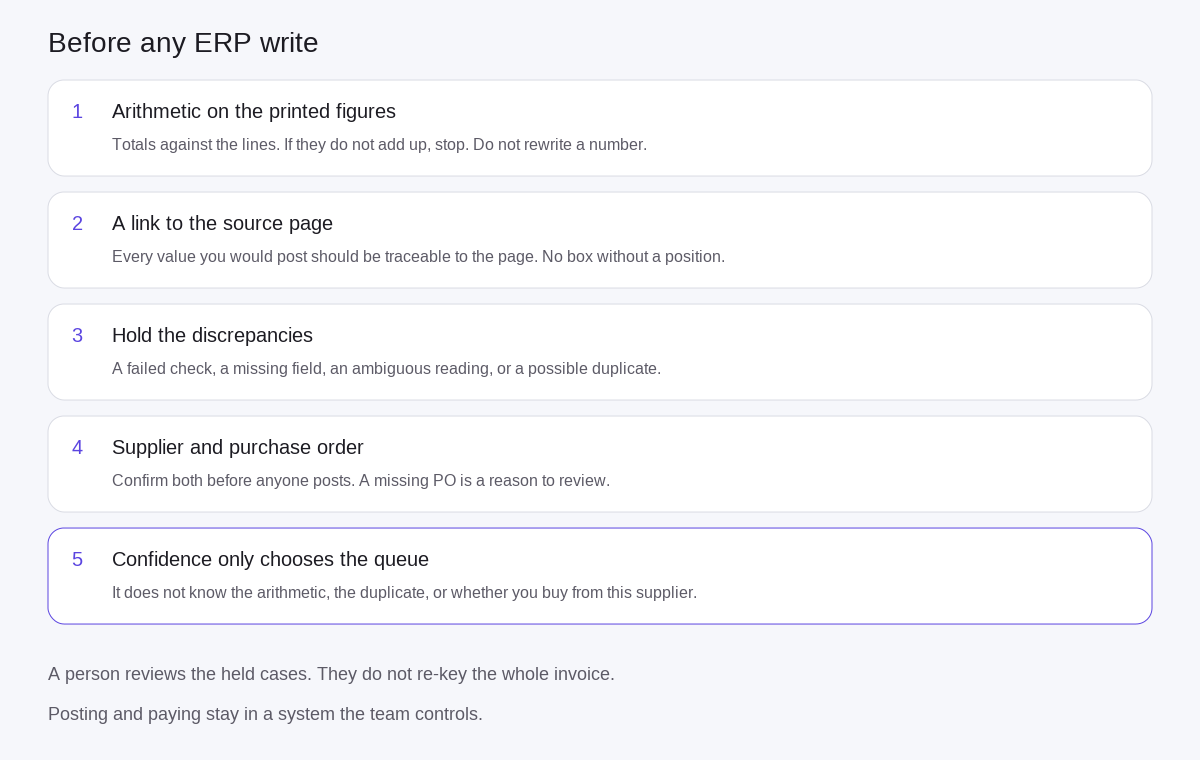
- Arithmetic on the printed figures. Compare the totals with the line items. Quantity times unit price equals the line amount is a check you should run: it is process advice for the write, not a license to replace a printed number. If the figures do not add up, stop. Do not rewrite a number so the document will pass.
- Every value intended for posting should be traceable to the source page.
- Hold the document when a check fails, a required field is missing, a reading is ambiguous, or the invoice may be a duplicate. A person reviews those cases. They do not re-key the whole invoice.
- Confirm the supplier and the purchase order before anyone posts. A missing purchase order is a reason to review, not a blank to fill in afterwards.
- A confidence threshold only routes work. It does not know about arithmetic, duplicates, or whether the supplier is one you buy from.
How should you validate invoice totals and line items before an ERP write?
Compare the printed totals with the line items. Quantity times unit price should equal the line amount: run that as process advice before the write. The sum of the lines and the VAT the invoice prints should agree with the net and the gross. If they do not add up, stop. Do not rewrite a number so the document will pass.
On an invoice, DocSolved runs those checks on the printed figures. It compares the totals with the line items, and it checks each line: quantity times unit price, and net plus VAT against that line. If the amounts do not add up, it keeps the values shown on the document and marks the invoice Needs review. It does not change a value to make the totals pass. The line arithmetic is a check the product runs, and it is also process advice you run before an ERP write. The confidence-thresholds guide describes the same stop rule and does not present quantity times unit price as a separate heading.
A line that continues on the next page is a different job, done before this arithmetic. That guide is How to join invoice line items that continue on the next page.
How do you link an extracted invoice field back to the source page?
Keep the page and the position the value was read from, and show the value beside that page. Where a position was found, selecting the field highlights that snippet. Where no position was found, do not invent a box. Compare the value with the page shown beside it.
In DocSolved the value is shown beside the page. Where a position on the page was found, selecting the field highlights that snippet. A box is drawn for that position. It is not drawn when no position was found. Some results carry no page position, and then you compare the value with the document shown beside it.
What should happen when an extracted invoice fails a check, is a possible duplicate, or has no purchase order?
Hold it. A failed check, a missing required field, an ambiguous reading, a possible duplicate, or a missing purchase order is a reason for a person to review that discrepancy. The person does not re-key the whole invoice. Do not fill in a missing purchase order after posting.
Needs review means a required field is missing, a check failed, only part of the PDF was analyzed, a value could be read in more than one way, or the AI was unavailable. When a later document has the same type, vendor, number, total and date as one saved earlier, DocSolved marks the later one Possible duplicate. The comparison needs a vendor and either a number or a total. The earlier document is not itself flagged as the copy. You still decide whether anything is posted. A confidence score is not part of that comparison.
You can see a totals disagreement, with the value beside the page, on the invoice review demo. No account is needed. Open the invoice review demo.
How do you match an invoice to a vendor and a purchase order before posting?
Confirm the supplier is one you buy from, and confirm the purchase order, before anyone posts. Make the match a step that runs before the write. A missing purchase order goes to review. A supplier you do not recognize goes to review. A high score on the supplier name does not skip this step.
Is carrying an order reference the same as an automatic three-way match?
No. An order reference is a number the invoice prints. Grouping related documents lets a person see an order with its deliveries, invoices and credit notes. That is not an automatic three-way match against goods received, and it is not an ERP posting. DocSolved can suggest related documents. When an invoice, a purchase order and a delivery note already link, it can attach a summary of quantities and of whether the totals differ. That summary does not change the pair scores, and it does not book or pay the invoice. Possible matches stay suggestions.
An invoice in DocSolved can carry an order reference, the buyer's purchase-order number, when the document prints one. A dossier groups an order with its deliveries, invoices and credit notes so you can confirm how they relate. Find related documents can list why a document was found, for example the same order reference. None of that writes to an ERP, and none of it is a goods-received approval to pay.
What is the difference between extracted, reviewed, approved and posted?
Extracted is what was read. Reviewed is a document a person has checked and completed. Approved is a further sign-off, and only when the workspace requires approval. Posted is the write into the ERP, which a person or a system you control still takes afterwards. Ready means the automated checks passed, or a person settled the ones that did not. Ready does not mean a person has checked every value, unless that workspace requires approval.
Where a field has a confidence score, DocSolved treats it as a triage signal, not a human verification. Ready is the automated decision. Approval is a workspace setting, off unless that workspace requires it. A connector then stays in review until a person has signed the document off. Integrations should start an accounting write from approval, not from extraction. Exporting records the status. It does not itself wait for a person, so check the status before you rely on an export.
Does a document-extraction tool book or pay the invoice?
No. A document-extraction tool prepares the data. Booking the invoice and paying it are later steps in a system the team controls. DocSolved does not book or pay anything, and it has no direct connection to accounting software.
DocSolved prepares the data. It exports CSV files laid out for an import you run yourself, and a signed document.approved webhook is the event to start a write in a system you control. There is no direct connection to accounting software. DocSolved does not host a mailbox: email arrives through an inbound provider and is handed to the API. Only the first 5 pages of each document are analysed. An export of a longer file says that totals, line items and other values from the remaining pages are missing.
The same limits, and the statement that DocSolved prepares the data and does not book or pay anything, are on Document extraction for business workflows and in the User Guide.
A test on 30 to 50 invoices
This is the same test as the confidence-thresholds guide. It is not a new benchmark, and this page does not offer a percentage to aim at.
Take 30 to 50 recent invoices, including a known duplicate, a total that does not add up, and a missing purchase order.
- Count how many of the 30 to 50 would have been written to the ERP on the confidence threshold alone.
- Count how many the full checklist would have held back: arithmetic, a value that cannot be found on the page, a possible duplicate, the supplier, and a missing purchase order.
The result is a count on your own invoices. This guide does not offer a percentage to aim at.
Read the longer version of that test here: How to set OCR confidence thresholds so invoice errors never reach the ERP.
The same answer, in one sentence
An LLM on a mailbox that drafts invoices is a prototype: an auditable AP process checks the print, links each value to the page, holds the discrepancies, and lets a person or a system you control write to the ERP.
How to set OCR confidence thresholds so invoice errors never reach the ERP.
Open the invoice review demo. No account is needed.
Create a free account. The first 100 pages are free, one time, with no card.
Sources
- r/CFO, Anyone from real companies actually using AI. Title taken from the address. Not quoted, and not used for any figure.
- DocSolved, How to set OCR confidence thresholds so invoice errors never reach the ERP. For the threshold as a routing rule, the checklist before an ERP write, and the 30 to 50 invoice test.
- DocSolved, How to join invoice line items that continue on the next page. For a line split by a page break, which is a step before the arithmetic.
- DocSolved User Guide. For Needs review and Ready, totals checks, possible duplicates, the order reference, and related documents.
- DocSolved, document extraction for business workflows. For the statement that DocSolved prepares the data and does not book or pay anything.
- Invoice review demo. A totals disagreement flagged for review. No account is needed.
- Analyze, where a free account starts. A free account includes 100 pages, one time, with no card.