Guide
How to set OCR confidence thresholds so invoice errors never reach the ERP
Short answer: An OCR confidence threshold is a routing rule. It does not by itself prevent OCR errors in the ERP. Use field, table, row and cell scores where you have them, then a human-in-the-loop check of the value beside the page. Before any write, the arithmetic, the vendor and the purchase order, and a duplicate block still have to pass. If you have no measured cut-off, the default is review.
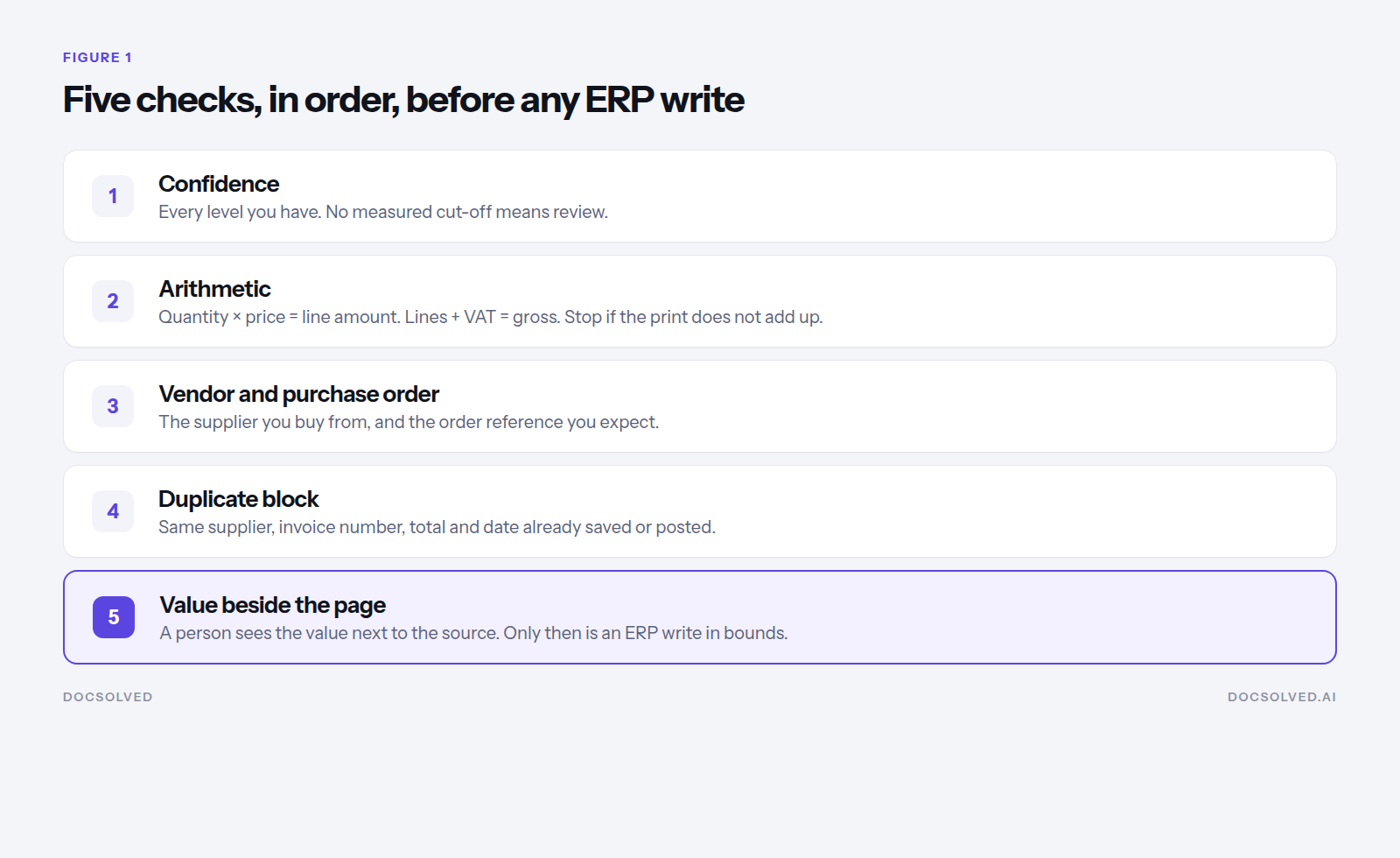
The five checks before an ERP write
Run these in order. A later check does not repair a failure in an earlier one, and none of them is optional because a score was high.
- Confidence, at every level you have. Set a threshold per document type. If you have not measured one, the default is review.
- Arithmetic on the printed figures. Quantity times unit price equals the line amount. The sum of the lines plus VAT equals the gross. Stop when they do not add up. Do not change a number to force the sum.
- Vendor and purchase order. The supplier is one you buy from, and the order reference is the purchase order you expect, before anyone posts.
- Duplicate block. The same supplier, invoice number, total and date is already saved or already posted.
- The value beside the page. A person sees the extracted value next to the source when any earlier check failed. Only then is an ERP write in bounds.
How do I set OCR confidence thresholds for invoices?
Set a separate OCR confidence threshold for each document type, and for each score the extractor actually returns: field, and table, row or cell when those exist. Measure the cut-off on your own invoices. Anything below it, and anything with no score, goes to a person. Until that measurement exists, the default is review, not a guessed number.
Take 30 to 50 recent invoices, including the awkward ones: a stamp over a total, a photo of a paper invoice, a supplier whose layout you have not seen. Write down the correct value for the fields you would post. Run the extractor. For each score level you receive, note the lowest score that was still correct and the highest score that was wrong. Put the threshold between those two, separately for each document type. A single company-wide number hides a supplier whose invoices always look unfamiliar.
If the wrong values and the correct values overlap, you do not have a safe cut-off yet. Keep that document type in review and collect more invoices. Guessing 0.90 because it sounds high is how a confident wrong total gets posted.
In DocSolved, an administrator can set an auto-routing threshold. The default is 0.80, on a scale from 0 to 1. It uses the lowest confidence among populated scalar fields that have a score. Line items are not part of that score. If no field has a usable score, the document is not auto-routed. A second control, auto-confirm, can mark individual fields verified at or above a threshold the administrator chooses. It is off unless someone turns it on, and it never auto-confirms line items or a missing required field. The default of 0.80 is a product setting, not a measurement of your suppliers. A score at or above it is not a person checking the value, and neither control posts the invoice.
Where a field has a confidence score, DocSolved treats it as a triage signal, not a human verification. The user guide's example is a value read by the fallback parser. Open Show evidence details to see the score. A confidence chip, when one is shown, is green for the scores least likely to need a look, and amber or red for the ones that deserve one. Boxes on the preview are not colored by confidence. DocSolved also records a confidence score for the detected document type. That score is about the type, not about a field.
Why is a confidence threshold not enough to stop OCR errors reaching the ERP?
A confidence threshold does not stop OCR errors from reaching the ERP. The score is an estimated probability that a reading is correct. It does not check the arithmetic, it does not know which vendor you buy from, and it does not see that the same invoice was already posted. A high score can sit on a bad total, a duplicate, or a value that is not on the page. The threshold only chooses the queue.
Four ordinary cases show why. A total can be read from the right place and still fail to add up with the lines, and the field score can be high because the digits were clear. The same invoice can arrive twice, once from the supplier and once from a mailbox forward, with a high score both times. The supplier name can be read perfectly and still be a vendor you do not buy from. A number can be produced for a field that is not on the page. None of those failures is a low confidence score. A gate that only looks at the score lets them through.
Use the threshold to decide who looks. Use the other four checks to decide what may be written. If the ERP posting is hard to reverse, a miss in any check holds the invoice.
What confidence scores should I use: field, table, row or cell?
Use every confidence score you actually have: field, table, row and cell. A high cell score can sit in a low-scoring row, so do not accept a line because one cell looks certain. Where a level is missing, do not invent a number for it. Send that line to a person. Microsoft's Document Intelligence 4.0 documentation describes these levels for its own API. It is a source on what the scores mean, not a product recommendation.
Microsoft Learn, in Interpret and improve model accuracy and confidence scores for Document Intelligence 4.0, says a confidence score indicates probability: the estimated statistical certainty that the extracted result is correct. Field confidence is an estimated probability between 0 and 1. Their example is that 0.95 means the prediction is likely correct 19 times out of 20, and that in accuracy-critical work the score can decide whether to accept the prediction or flag it for a person. The same page says that not every field returns a score.
For custom models, that page says field-level confidence includes word confidence from the 2024-11-30 API, and that confidence scores for tables, table rows and table cells are available starting with that same API version. On a high cell score in a low-scoring row, the page says the levels measure different things: a correctly predicted cell can score high while the row scores low, because other cells in that row may be misses. A correct row in a troubled table can score high while the table scores low. The page suggests reading a table from the top down: the table, then each row, then the cells. It also says a merged cell should score lower, and a row split across pages can keep a high cell score while the row score is lower than a row that is not split.
Those statements describe Microsoft's API. They are cited here so the words field, table, row and cell have a published meaning. They are not a recommendation to buy or switch products, and they are not a description of every extractor. If your extractor only returns a field score, say so in the design and send the line items to review. Do not pretend a header score is a cell score.
DocSolved shows a confidence score where a field has one, and a separate score for the detected document type. The auto-routing threshold looks only at scalar fields that have a score, and it leaves line items out of that lowest score. A strong header score therefore does not clear the table. Where no usable score exists, the document is not auto-routed.
What is a human-in-the-loop review queue for invoice OCR?
An invoice OCR human-in-the-loop queue is the list a person works before posting. Put an invoice there when a score is below the threshold, the arithmetic fails, a required field is missing, a reading is ambiguous, or the invoice may be a duplicate. The reviewer sees the extracted value beside the source page and accepts it, corrects it, or stops it. Extracted is not the same as reviewed.
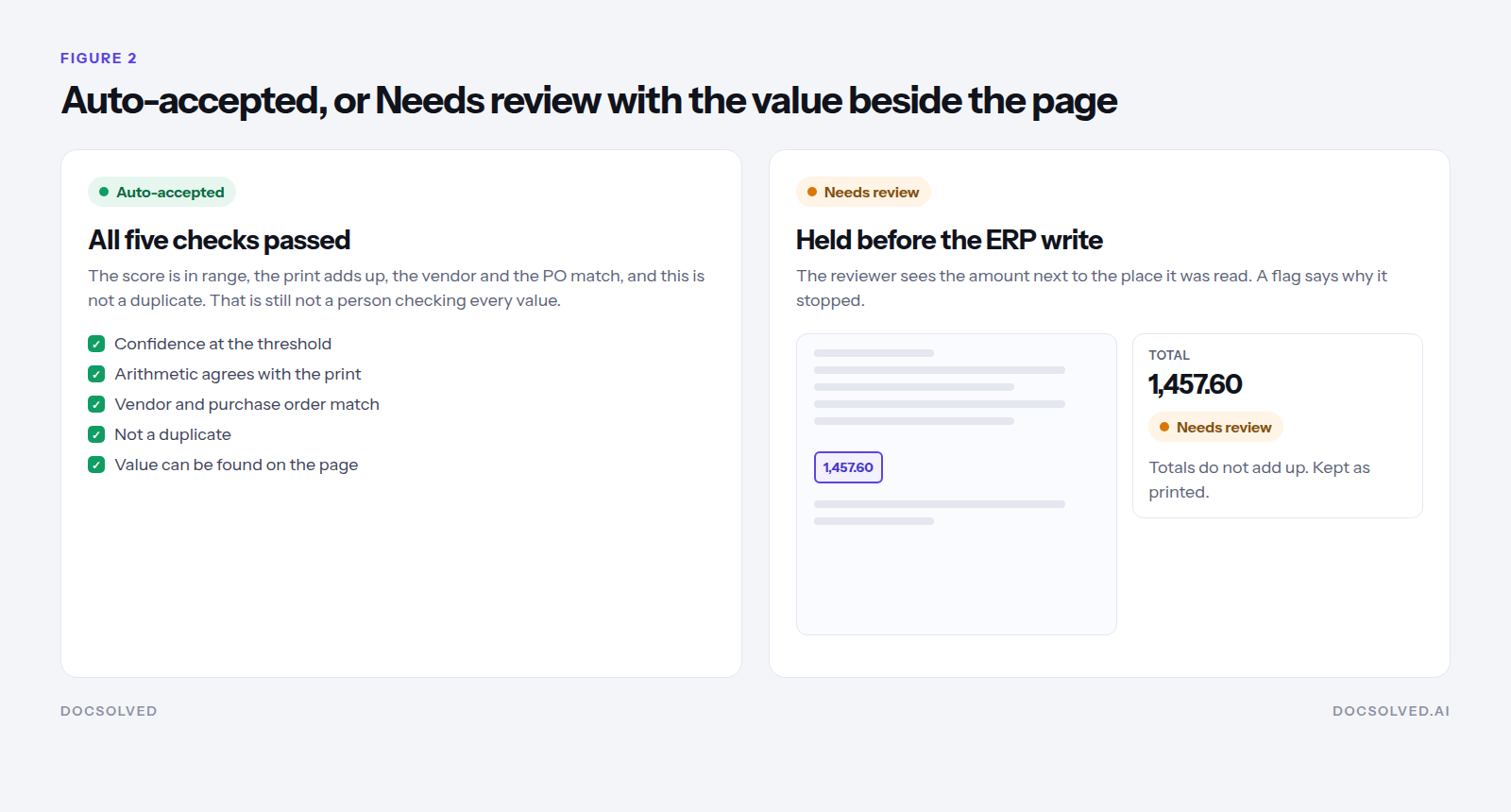
What enters the queue: a score below the threshold for that document type, a score that is missing, arithmetic that does not match the print, a required field with no value, a reading that could be two different amounts or dates, and a possible duplicate. What stays out, if you auto-accept at all, is an invoice that passed every check above. What the reviewer sees is the value next to the page it came from, with the reason it was held.
In DocSolved the value is shown beside the document. Where a position on the page was found, selecting the field highlights the snippet it was read from. A box is drawn for that position. It is not drawn for every value. Some results carry no page position, and then you compare the value with the document shown beside it.
Needs review means a required field is missing, a check failed, only part of the PDF was analyzed, a value could be read in more than one way, or the AI was unavailable. The result becomes Ready when no such issue is left open: either the automated checks found none, or you answered or accepted each one. Ready does not mean a person has checked every value. Checking the values yourself stays optional unless the workspace requires approval.
Extracted values are what was read. A reviewed document is one a person has checked and completed. An approved document has also been signed off by a workspace admin, where the workspace requires approval. After review, posting to the ERP and paying the invoice are still human tasks. DocSolved prepares the data. It does not book or pay anything.
How should I validate invoice line items before an ERP posting (quantity × price, VAT, gross)?
Before an ERP posting, check the printed line items in two steps. Quantity times the unit price should equal the line amount. The sum of the lines plus VAT should equal the gross. If the figures on the invoice do not add up, stop and ask a person. Do not change a number so the totals will pass. A confidence score on a header field does not do this arithmetic.
Do the arithmetic on the figures the invoice prints, in the invoice's own currency. A line that shows quantity 10 and a unit price of 5.00 should show a line amount of 50.00. Add the line amounts, add the VAT the invoice prints, and compare that with the gross. A one-cent difference from rounding is a rule you should write down. A difference of a whole tax amount is not rounding. Hold it.
Two shortcuts cause bad postings. The first is trusting the gross because its field score was high and never adding the lines. The second is overwriting the gross with the calculated sum so the ERP will accept the document. If the supplier's print does not add up, the calculated sum is a different document from the one you received. Keep the print and let a person decide.
On an invoice, DocSolved runs automatic totals checks and compares the totals with the line items. DocSolved does not change a value to make totals add up. If the amounts printed on an invoice do not add up, it keeps the values shown in the original document and flags the inconsistency. Quantity times unit price is a check you should run in the process above. It is not stated here as a separate named DocSolved rule.
How do I match an invoice to a vendor and a purchase order before posting?
Match the invoice to the vendor and to the purchase order before anyone posts it. The supplier should be a vendor you buy from, and the order reference should be a purchase order you expect. A missing PO is a reason to review, not a blank to fill in after posting. Carrying an order reference, or grouping related documents, is not the same as an automatic three-way match against goods received.
Make the match a step that runs before the write, not a report you read afterwards. The vendor match asks whether this supplier is one your company buys from, under the name or tax number you already hold. The purchase-order match asks whether the order reference on the invoice is an open PO, and whether the invoice is the one you expected against it. A missing order reference goes to the queue. So does a supplier you do not recognise. A person resolves both. Do not let a high confidence score on the supplier name skip this, because a clearly printed name can still be the wrong vendor.
An invoice in DocSolved can carry an order reference, the buyer's PO number. Find related documents searches your invoices, purchase orders, delivery notes and packing slips by that order reference or by supplier name. It lists why a document was found, for example the same order reference, and it can note a difference such as a different supplier. A dossier groups an order with its deliveries, invoices and credit notes so you can confirm how they relate. Possible matches are suggestions. DocSolved does not run an automatic three-way match of the invoice, the purchase order and the goods received.
How do I stop duplicate invoices being written to the ERP?
Stop a duplicate invoice before the ERP write. Block the posting when the same supplier, invoice number, total and date is already saved or already posted, and hold the later document for a person. Run this check even when every confidence score is high. The score does not know about the earlier invoice.
Decide the key before you automate. A practical key is supplier, invoice number, total and date. Use the same key in the archive of documents you have already saved and in the ERP, if you can query it. A second copy with a high score is still a second copy. Hold it, show the earlier document beside it, and let a person mark it as a true duplicate or as a different invoice that happens to share some of the figures.
When a document has the same type, vendor, number, total and date as one saved earlier, DocSolved marks the later one Possible duplicate, and View duplicates lists the copies. The earlier document is not itself flagged as the copy. You still decide whether anything is posted. A confidence score is not part of that comparison.
When should an extracted invoice be auto-accepted, and when should a person review it?
Auto-accept an extracted invoice only when every check you rely on has passed: the scores you use are at or above the threshold for that document type, the arithmetic agrees, the vendor and the purchase order match, and the invoice is not a duplicate. A person reviews everything else. Auto-accept is not a human verification, and it is not the posting. A person, or a system you control, writes to the ERP after that.
Auto-accept is a narrow path. All of the following are true: every score level you use is at or above the threshold you measured for that document type, the line arithmetic and the gross agree with the print, the vendor matches, the purchase order matches or your rule explicitly allows a missing PO, and the duplicate check is clear. If any one of those is false, or if you never measured the threshold, a person reviews the invoice. A new supplier, a new layout, and the first invoices after a model change belong in the queue even when the scores look high.
In DocSolved, Ready means no automatic issue is left open. It does not mean a person has checked every value, unless the workspace requires approval. Approval is a separate state: an approved document is one a person has signed off. Integrations should start accounting writes from approval, not from extraction. There is no direct connection to accounting software. DocSolved exports CSV files laid out for QuickBooks, Xero, DATEV or a generic import, which you import yourself, and a signed document.approved webhook is the event to start an accounting write. Exporting does not wait for review, so check the status before you rely on an export. DocSolved prepares the data. It does not book or pay anything.
Is a confidence score the same as a human verification?
No. A confidence score is not a human verification. The score is an estimated probability from the model. Verification is a person comparing the value with the page and accepting it. A high score is a reason to look less often. It is not a reason to skip the page when the posting is hard to undo.
Microsoft's page on confidence scores says the score can be used to decide whether to accept a prediction automatically or flag it for human review. That is a routing use. It does not say the score is the review. The same page says to consider human review in the workflow. For financial or medical records it recommends an accuracy score close to 100 percent, and it says you can add a human review stage for critical automation.
Where a field has a confidence score, DocSolved shows it as a triage signal, not a human verification. Reviewing or confirming a field is a separate step from extraction. Structured e-invoices do not use that score: the values are read from XML, and they carry a trust status instead. Fields are not verified automatically unless an administrator turns on confidence-based auto-confirmation, which is off by default.
What should happen when invoice totals do not add up after OCR?
When invoice totals do not add up after OCR, stop. Keep the figures printed on the invoice and send the document to a person. Do not replace the total with a calculated one so the posting will succeed. The difference may be a reading error, or it may be the supplier's own arithmetic. A person decides which, records the decision, and only then can the invoice move on.
Write the rule down where the integration can see it: a totals mismatch blocks the ERP write. The reviewer compares the subtotal, the VAT and the gross with the page. If the reading was wrong, they correct the value from the page. If the invoice itself does not add up, they record that and decide whether to ask the supplier or to post the printed figures with a note. They do not silently replace the printed total with a sum that happens to balance.
DocSolved does not change a value to make totals add up. If the amounts printed on an invoice do not add up, it keeps the values shown in the original document and flags the inconsistency. If the values are right and the difference is real, choose Keep as printed on the totals item and say why: the document itself does not add up, or the check does not fit this document. Nothing is recalculated. The decision is recorded, and the document can become Ready. You can undo that choice until the review is completed.
Where these checks show up in DocSolved
The checks above are the process. DocSolved is one place to run the parts of that process that are about the document in front of you: a confidence score where a field has one, automatic totals checks, a possible-duplicate mark, the order reference, related documents, and the value beside the page with a Needs review flag. You can define your own fields. A saved template keeps the same fields for every document of that kind, and a custom extraction does it once without saving a template.
DocSolved does not use your documents or extracted data to train AI models.
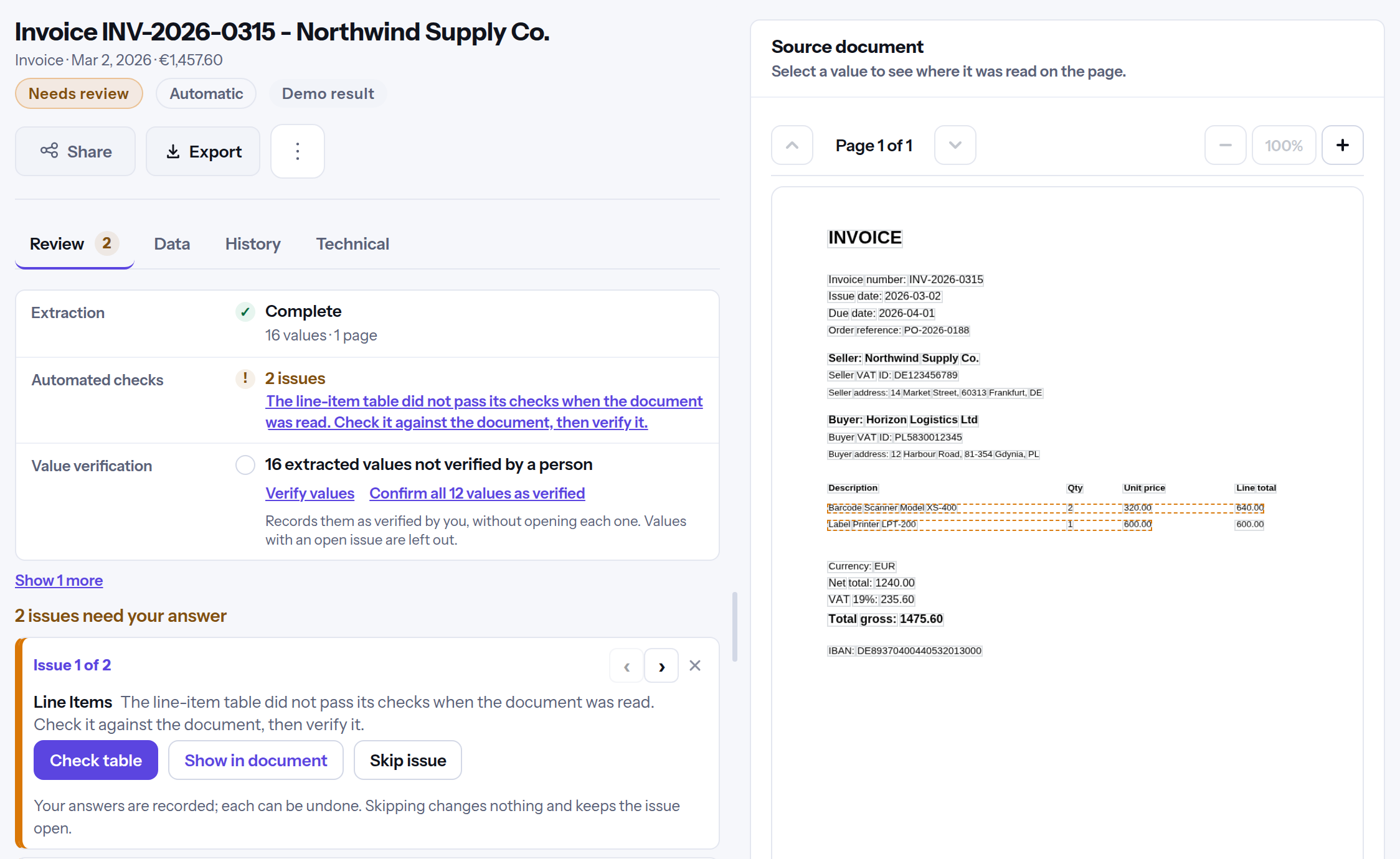
- Open the invoice review demo. No account needed.
- Create a free account. The first 100 pages are free, one time, with no card.
- Related guides: Extract data from PDFs · AI document extraction for business workflows · LLM or OCR pipeline? When a general AI model is enough for document data · How to join invoice line items that continue on the next page · When is an AI agent in accounts payable actually auditable? · Why does the OCR provider bill more pages than your app counted?
A test on 30 to 50 invoices
Before you let any score post an invoice, run this on invoices you already understand. Include three that should be held: a known duplicate, an invoice whose printed totals do not add up, and an invoice with no purchase order.
- Count how many of the 30 to 50 would have been written to the ERP on the confidence threshold alone.
- Count how many the full checklist would have held back: arithmetic, vendor, purchase order, duplicate, and a value that cannot be found on the page.
- Look at the ones the threshold would have posted and the checklist would have held. Those are the errors the score cannot see.
The result is a count on your own invoices. It will not match anyone else's, and this guide does not offer a percentage to aim at. If the checklist holds invoices the threshold would have posted, keep the threshold as a routing rule and keep the other checks in front of the ERP.
A free DocSolved account includes 100 pages, one time, with no card. That is enough to put a short set through extraction, the totals check, the duplicate mark and the review screen. The invoice review demo needs no account: it opens an invoice whose totals do not agree, with the value beside the page.
FAQ
How do I set OCR confidence thresholds for invoices?
Set a separate OCR confidence threshold for each document type, and for each score the extractor actually returns: field, and table, row or cell when those exist. Measure the cut-off on your own invoices. Anything below it, and anything with no score, goes to a person. Until that measurement exists, the default is review, not a guessed number.
Why is a confidence threshold not enough to stop OCR errors reaching the ERP?
A confidence threshold does not stop OCR errors from reaching the ERP. The score is an estimated probability that a reading is correct. It does not check the arithmetic, it does not know which vendor you buy from, and it does not see that the same invoice was already posted. A high score can sit on a bad total, a duplicate, or a value that is not on the page. The threshold only chooses the queue.
What confidence scores should I use: field, table, row or cell?
Use every confidence score you actually have: field, table, row and cell. A high cell score can sit in a low-scoring row, so do not accept a line because one cell looks certain. Where a level is missing, do not invent a number for it. Send that line to a person. Microsoft's Document Intelligence 4.0 documentation describes these levels for its own API. It is a source on what the scores mean, not a product recommendation.
What is a human-in-the-loop review queue for invoice OCR?
An invoice OCR human-in-the-loop queue is the list a person works before posting. Put an invoice there when a score is below the threshold, the arithmetic fails, a required field is missing, a reading is ambiguous, or the invoice may be a duplicate. The reviewer sees the extracted value beside the source page and accepts it, corrects it, or stops it. Extracted is not the same as reviewed.
How should I validate invoice line items before an ERP posting (quantity × price, VAT, gross)?
Before an ERP posting, check the printed line items in two steps. Quantity times the unit price should equal the line amount. The sum of the lines plus VAT should equal the gross. If the figures on the invoice do not add up, stop and ask a person. Do not change a number so the totals will pass. A confidence score on a header field does not do this arithmetic.
How do I match an invoice to a vendor and a purchase order before posting?
Match the invoice to the vendor and to the purchase order before anyone posts it. The supplier should be a vendor you buy from, and the order reference should be a purchase order you expect. A missing PO is a reason to review, not a blank to fill in after posting. Carrying an order reference, or grouping related documents, is not the same as an automatic three-way match against goods received.
How do I stop duplicate invoices being written to the ERP?
Stop a duplicate invoice before the ERP write. Block the posting when the same supplier, invoice number, total and date is already saved or already posted, and hold the later document for a person. Run this check even when every confidence score is high. The score does not know about the earlier invoice.
When should an extracted invoice be auto-accepted, and when should a person review it?
Auto-accept an extracted invoice only when every check you rely on has passed: the scores you use are at or above the threshold for that document type, the arithmetic agrees, the vendor and the purchase order match, and the invoice is not a duplicate. A person reviews everything else. Auto-accept is not a human verification, and it is not the posting. A person, or a system you control, writes to the ERP after that.
Is a confidence score the same as a human verification?
No. A confidence score is not a human verification. The score is an estimated probability from the model. Verification is a person comparing the value with the page and accepting it. A high score is a reason to look less often. It is not a reason to skip the page when the posting is hard to undo.
What should happen when invoice totals do not add up after OCR?
When invoice totals do not add up after OCR, stop. Keep the figures printed on the invoice and send the document to a person. Do not replace the total with a calculated one so the posting will succeed. The difference may be a reading error, or it may be the supplier's own arithmetic. A person decides which, records the decision, and only then can the invoice move on.
Sources
- Microsoft Learn, Interpret and improve model accuracy and confidence scores, Document Intelligence 4.0. Cited for what a confidence score is, including field, table, row and cell scores on the 2024-11-30 API for custom models. Not a product recommendation. https://learn.microsoft.com/en-us/azure/ai-services/document-intelligence/concept/accuracy-confidence?view=doc-intel-4.0.0
- DocSolved User Guide, for confidence as a triage signal, Needs review and Ready, totals checks, possible duplicates, the order reference, and related documents. https://docsolved.ai/guide
- DocSolved, document extraction for business workflows, for totals compared with the line items, the review queue, and the statement that DocSolved prepares the data and does not book or pay anything. https://docsolved.ai/document-extraction-for-business-workflows
- DocSolved pricing: a free account includes 100 pages, one time, with no card. https://docsolved.ai/pricing
- Invoice review demo, no account needed. https://docsolved.ai/demo/invoice-review
- Analyze, where a free account starts. https://docsolved.ai/analyze
An OCR confidence threshold routes the invoice. It does not, by itself, prevent OCR errors in the ERP. The arithmetic, the vendor and the purchase order, the duplicate block, and the value beside the page still have to pass.
See an invoice that needs review Create a free account
No account is needed for the demo. A free account includes 100 pages, one time, with no card.