Guide
LLM or OCR pipeline? When a general AI model is enough for document data
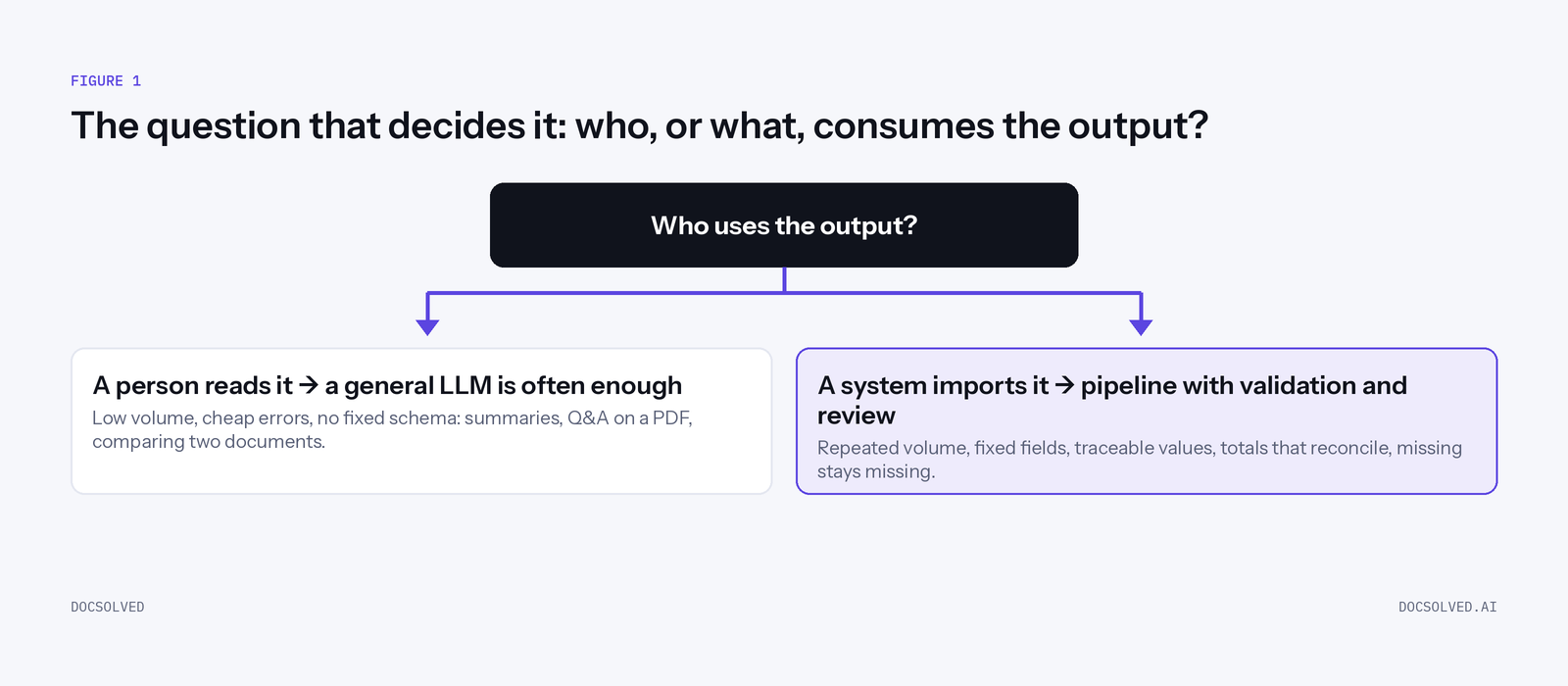
Short answer: A general multimodal LLM is often enough when a person reads the result: summarising a contract, answering a question about a PDF, or checking one document. You need an OCR and validation pipeline when the output becomes data that another system trusts: many documents of the same type, a fixed set of fields, values that must be traced back to the page, totals that must reconcile, and missing fields that must be flagged rather than guessed. The model can be part of that pipeline. Validation is what makes its output safe to use.
Why is this question coming up now?
General-purpose models keep getting better at reading documents. On 18 November 2026, Google introduced Gemini 4 Neon. Google says it reads uploads such as spreadsheets, PDFs and photos "more precisely", works with a 1 million-token context window and turns mixed inputs into structured deliverables. Google reports a score of 73.5% on Chartography, a benchmark for reading dense professional charts, and says Neon recorded its lowest fabrication rate yet in internal testing.
These are Google's own claims and benchmark results, not an independent test on business documents. They are still a useful signal. If a general model can read a delivery note well, why build anything else?
The answer depends less on how well the model reads and more on what happens to the result.
What is the difference between OCR, an LLM and a document pipeline?
| Classic OCR | General multimodal LLM | Document pipeline | |
|---|---|---|---|
| What it produces | Text, usually with positions on the page | An answer, summary or JSON you asked for | Named fields in a fixed schema, with checks |
| Knows what a field is | No | Yes, from your prompt | Yes, from the schema |
| Links a value to where it was read | Yes, at text level | Not by default | Should, for every field |
| Same input, same output | Yes | Not guaranteed | Designed to be repeatable |
| Flags missing or doubtful values | No | Only if asked, and not reliably | Yes, as a rule |
| Typical use | Searchable scans, text layers | Reading, Q&A, one-off extraction | Invoices, orders, forms at volume |
A pipeline is not the opposite of an LLM. Many modern pipelines use OCR, a layout or parsing model, an LLM, or a mix of them. What makes it a pipeline is the part around the model: a schema, validation rules, a confidence or review step, and an audit trail.
When is a general LLM enough?
A general model is usually enough when all of these are true:
- A person reads the output. Someone sees the summary or answer and judges it.
- Volume is low. A handful of documents, not a daily batch.
- Errors are cheap. A wrong detail costs a follow-up question, not a wrong payment.
- No fixed schema is needed. You want an explanation, not a row in a table.
Examples: "What are the termination terms in this contract?", "Summarise this 60-page tender", "Compare these two price lists."
When do you need an OCR and validation pipeline?
You need a pipeline when the output feeds another system or a decision nobody re-reads:
- Repeated volume. The same document types arrive every day.
- A fixed set of fields. Supplier, invoice number, dates, net, VAT, total, line items.
- Traceability. A reviewer or auditor must see where each value came from on the page.
- Arithmetic and consistency. Line items must add up to the total. Dates must be valid.
- Missing must stay missing. If a field is not on the page, the right output is "not found", not a plausible guess.
- Repeatability. Processing the same file twice should give the same result.
Google's own emphasis on reducing fabrication shows why the last two points matter. Even a strong model can produce a value that looks right. In a pipeline, a rule or a reviewer catches it before it is exported.
What does data validation for documents actually check?
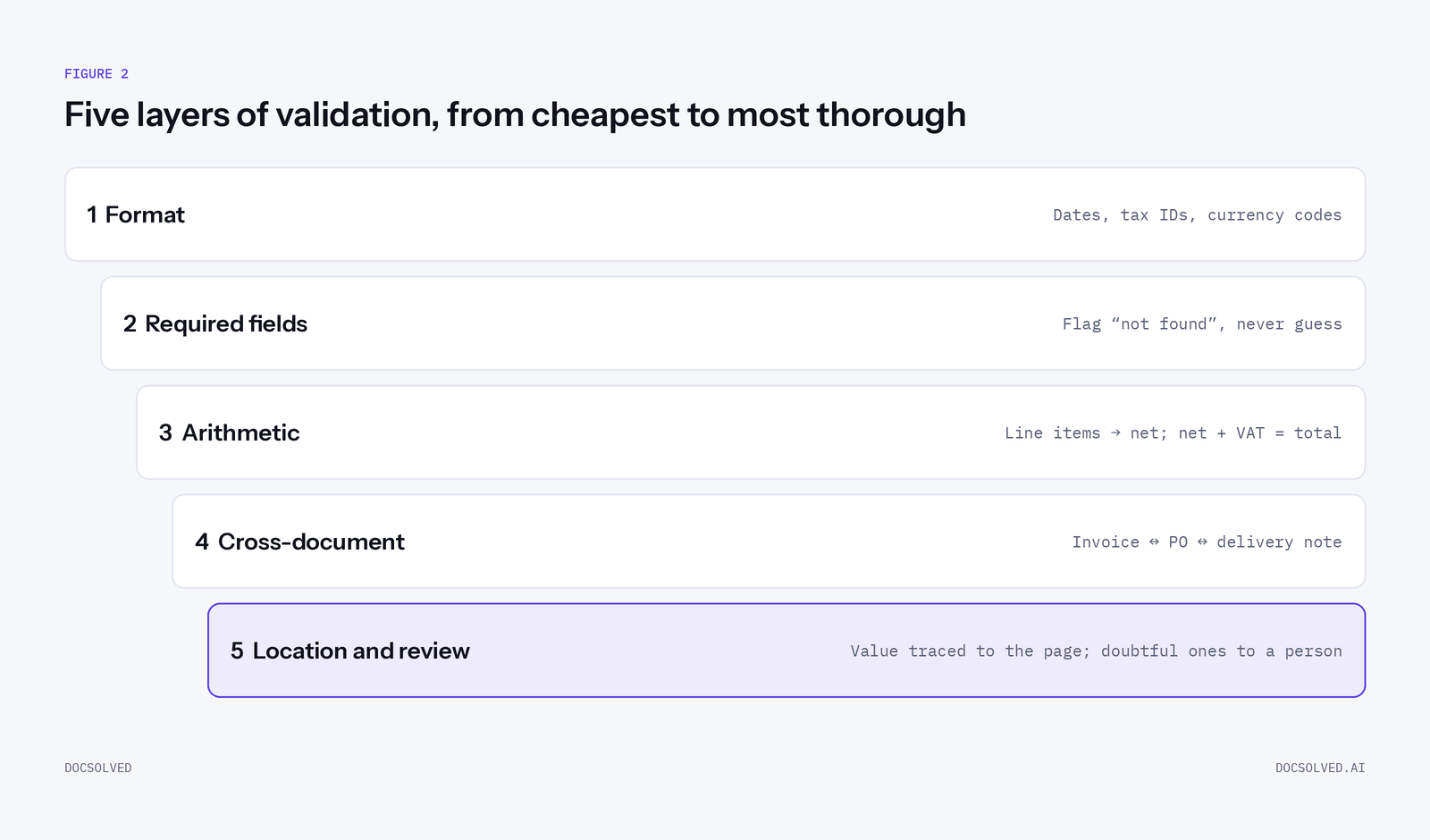
- Format. Is the date a real date? Is the tax ID in the right format? Is the currency code valid?
- Required fields. Is everything the downstream system needs present? If not, flag it.
- Arithmetic. Do line items × quantity add up to net? Does net + VAT equal the total?
- Cross-document checks. Does the invoice match the purchase order and the delivery note?
- Location and review. Can a person click a value and see where on the page it was read? Uncertain or unlocated values go to a human before export.
This is the approach DocSolved is built around. Extracted values are shown next to the original page, each value can be located on the source, and a document that fails a check is flagged "Needs review" for a person before you treat the result as confirmed. You can see it on the interactive invoice review demo, and the accuracy benchmarks page explains how we measure DocSolved, where it is weaker and what is not measured yet.
How do you test a model on your own documents?
Vendor benchmarks tell you where to start. Your own documents tell you what to buy. A simple test:
- Collect 30–50 real documents, including the bad ones: faxes, photos at an angle, stamps, handwriting.
- Write down the correct values for 8–12 fields per document by hand.
- Run each candidate (a general LLM, an OCR tool, a document pipeline) on the same set.
- Score each field as correct, wrong or missing. Count "wrong" separately: a confident wrong value is worse than a flagged missing one.
- Run the same set twice to check repeatability.
- Check whether each value can be traced to its place on the page.
The result is a field-level error rate on your own data. That number is worth more than any leaderboard.
Run this test in DocSolved. A free DocSolved account includes 100 pages, enough for a 30–50 document test set. You can define your own fields, compare each value with the place it was read from, and see which documents were flagged for review. Your documents are not used to train models, by DocSolved or by its AI providers under their API terms.
Try it on your own documents
- Create a free account: 100 pages to test on your own files.
- See the invoice review demo without signing up.
- Related guides: Extract data from PDF · Scanned PDF tables to Excel · Document extraction for business workflows · How to join invoice line items that continue on the next page · When is an AI agent in accounts payable actually auditable? · Why does the OCR provider bill more pages than your app counted?
FAQ
Can I use Gemini 4 Neon or another LLM for invoice extraction?
Yes, as one component. On its own, a general model does not guarantee a fixed schema, a link from each value to the page, or a "not found" when a field is missing. Add validation and review before the data reaches your ERP or accounting system.
Is classic OCR obsolete?
No. OCR still provides a reliable text layer with positions on the page, which helps with search and traceability. What changed is that understanding fields no longer needs hand-built templates.
What is the most important validation rule?
Required fields with an explicit "not found". It stops a missing value from being silently replaced by a guess.
How accurate do benchmarks say models are?
Benchmarks such as the ones Google reports for Gemini 4 Neon are run by the vendor or on public datasets. Treat them as a starting point and measure field-level accuracy on your own documents.
When should a human review a document?
When a required field is missing, an arithmetic check fails, a value cannot be located on the page, or the document type is new.
Can I test this without building my own pipeline?
Yes. Tools such as DocSolved combine extraction, validation checks and human review in one place, so you can run the 30–50 document test above on a free account before deciding what to build or buy.
Sources
- Google, "Introducing Gemini 4 Neon", Koray Kavukcuoglu, 18 November 2026. https://blog.google/innovation-and-ai/models-and-research/gemini-models/introducing-gemini-4-neon/
- DocSolved public samples and invoice review demo (product behaviour described above). https://docsolved.ai/ · https://docsolved.ai/demo/invoice-review
Free account: 100 pages, no card required.